
When a WooCommerce order is placed, the customer will pay for it, the order will be fulfilled and the item(s) dispatched, at which point the order will probably be marked as ‘Completed’.
This process is supported in WooCommerce and allows the order to go from ‘Pending’, to ‘Processing’, and finally to ‘Completed’ once the products have been sent out.
This is fine for orders where a physical item exists, but this seems not correct with virtual orders becuase there is no notion of postage or sending out items.
In this case, when someone paid via PayPal we needed to set the order straight to ‘Completed’ once payment had been received, instead of having to manually log into WordPress and update the order status ourselves.
The steps below explain how to achieved this, as well as how We overcame some problems along the way where We got stuck.
/**
* Auto Complete all WooCommerce orders.
* Add to theme functions.php file
*/

add_action( 'woocommerce_thankyou', 'custom_woocommerce_auto_complete_order' );
function custom_woocommerce_auto_complete_order( $order_id ) {
    global $woocommerce;

    if ( !$order_id )
        return;
    $order = new WC_Order( $order_id );
    $order->update_status( 'completed' );
}
</code>
Please note: The code is considered as custom coding and we are unable provide support for customizations. If you do need assistance, we recommend contacting one of our Affiliated WooWorkers.
 3. Activate PayPal IPN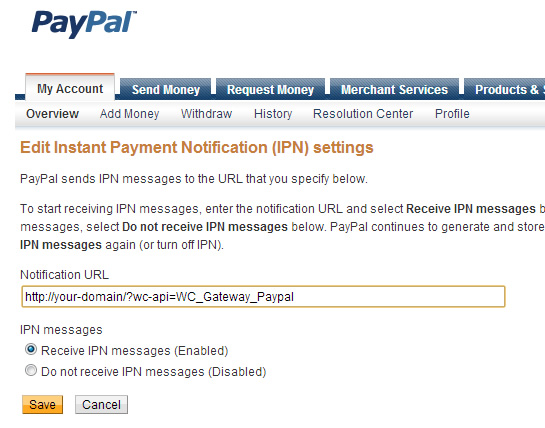
Simply enter the URL in the format ‘http://your-website .com/?wc-api=WC_Gateway_Paypal‘, enable IPN messages and click ‘Save’.
4. Please Make Sure that ‘RECEIVER EMAIL’ Is Correct
The last remaining step is to ensure the ‘Receiver Email’ setting in WooCommerce under the ‘PayPal’ section is set correctly. Normally I believe you should be able to leave this blank, however if you’ve changed it for testing or debugging purposes, it might be worth just making sure that this is correct. The final step is to simply carry out an order and hopefully, as soon as the payment has been made via PayPal, the order will automatically be set to ‘Completed’ in the WooCommerce back-end. No more having to login and set it manually.
Note: Another option for same issue can be get from WooCommerce Offical website WooCommerce Order Status Control






 Phone: